
How to file a CT600 yourself (without an accountant)

Prerequisites at a glance
- Time
- About 30 min
- Difficulty
- Intermediate
- Tools you'll use
-
- Government Gateway login (enrolled for Corporation Tax)
- Commercial CT600 filing software
- Have ready
-
- Company UTR
- Company registration number (CRN)
- Accounting period dates
- Final accounts figures (profit and loss and balance sheet)
- Last year's accounts and CT600
- Tax adjustment records
- Corporation Tax payment reference
In short: You can file your own Company Tax Return (the CT600) without an accountant. You need your company's UTR, a Government Gateway login enrolled for Corporation Tax, and your accounts and tax computations in iXBRL format. File within 12 months of your accounting period end, and pay any tax within 9 months and 1 day (GOV.UK: Company Tax Returns: Overview). Taxley prepares the CT600, the computation and the iXBRL accounts and files the return for £44.50 (promotion price until 31 Dec 2026; £89.00 from 1 Jan 2027) with micro-entity accounts, then files the accounts at Companies House once the return is paid and finished.
HMRC's own online filing service closed on 31 March 2026, so from 1 April 2026 you file through commercial software (or an agent) (GOV.UK: Closure of HMRC's file-your-accounts-and-tax-return service). For a straightforward company this is very doable; the hard part is producing the iXBRL accounts, which is what filing software handles for you.
Filing it yourself is realistic for a simple company: a small trading business, a property-holding company or a dormant one. It gets harder with an R&D claim, a terminal loss claim or any treatment you're not sure of. Check what your software supports before you start: Taxley's 30-second check shows whether it covers your company's return.
Can I file a CT600 myself?
Yes: a company can file its own CT600, because there is no legal requirement to use an accountant. What you cannot do is file a CT600 as a plain PDF or, for most companies, on paper: the return, accounts and computations go online, with the accounts and computations in a tagged iXBRL format.
HMRC's own "File your accounts and Company Tax Return" online service closed on 31 March 2026, and from 1 April 2026 HMRC says you should use commercial software; paper returns are accepted only with a reasonable excuse or if you're filing in Welsh (GOV.UK: Closure of HMRC's file-your-accounts-and-tax-return service). So "filing it yourself" now means using commercial filing software that produces the iXBRL for you — see how to choose CT600 software now HMRC's service has closed. Former users of that service can read File company accounts and tax return online now CATO has closed for what replaced it.
What do I need to file a CT600?
To file a CT600, you need the company's UTR and registration number, a Government Gateway login with Corporation Tax added, filing software, the period dates, final accounts figures, last year's filed figures and any tax adjustments. The UTR is 10 digits and the Corporation Tax payment reference 17 characters, so check you have the right number for each.
| What you need | Where to find it | Why it's needed |
|---|---|---|
| Company UTR (10 digits) | HMRC letters about the company's Corporation Tax, such as a notice to file or a payment reminder, or request it online and HMRC posts it to the address registered with Companies House | It identifies the company's Corporation Tax record. See what a UTR is and where to find it |
| Government Gateway user ID and password with Corporation Tax added | The login for the company's HMRC business tax account, once Corporation Tax services are added | Filing software submits the return to HMRC using these credentials |
| CT600 filing software | Commercial software that files to HMRC, since HMRC's own service closed on 31 March 2026 (GOV.UK: Closure of HMRC's file-your-accounts-and-tax-return service) | It sends the CT600 with the accounts and computation in iXBRL. Check it prepares those files too, or that someone else supplies them |
| Company registration number (CRN) | The certificate of incorporation, or the company's page on the Companies House register | The CT600 asks for it alongside the company's name and UTR |
| Accounting period dates | HMRC's letter giving your accounting-period dates, or HMRC's online business tax service (GOV.UK: Accounting periods for Corporation Tax) | A return covers one accounting period of no more than 12 months, and both deadlines run from its end |
| Final accounts figures: profit and loss account and balance sheet | Your approved statutory accounts for the period, or your bookkeeping records | The accounts go to HMRC with the CT600, in iXBRL (GOV.UK: Company Tax Returns: Overview) |
| Last year's accounts and CT600 | Your previous filing pack, or the accounts filed on the Companies House register | Opening balances and the prior-year comparison figures come from them, as do amounts carried forward, such as unused losses |
| Tax adjustments: capital allowances, losses brought forward, disallowable costs | Your fixed asset register, last year's tax computation and loss records, and your expense records | Accounting profit is adjusted to reach taxable profit (capital allowances, losses, disallowable expenses) |
| Corporation Tax payment reference (17 characters) | Your notice to deliver the tax return, HMRC reminders, or the company's HMRC online account (GOV.UK: Pay your Corporation Tax bill by bank transfer) | Payment is due before the return, and the wrong reference can delay the payment or put it against a different bill |
For how the CT600, accounts and computations fit together, see what a CT600 is and how to file one.
How do you file a CT600, step by step?
Filing a CT600 takes seven steps: confirm your accounting period and deadlines, prepare iXBRL accounts, work out the tax, complete the CT600, submit it to HMRC, pay and keep records, then check HMRC accepted the return. Mind the order of the deadlines: the tax is due at 9 months and 1 day, before the 12-month filing deadline.
Step 1: Confirm your accounting period and deadlines
Your Corporation Tax accounting period is normally your company's 12-month financial year. Note the two deadlines that flow from its end date: pay within 9 months and 1 day, and file the CT600 within 12 months. The payment deadline comes first — see Corporation Tax deadlines explained. A long first period over 12 months is split into two returns.
Step 2: Prepare your statutory accounts as iXBRL
Your accounts must be tagged to the FRC taxonomy in inline XBRL. Micro-entities use FRS 105; slightly larger small companies use FRS 102 §1A — see FRS 105 vs FRS 102 §1A. This tagging is the step you cannot realistically do by hand; software generates it from your figures.
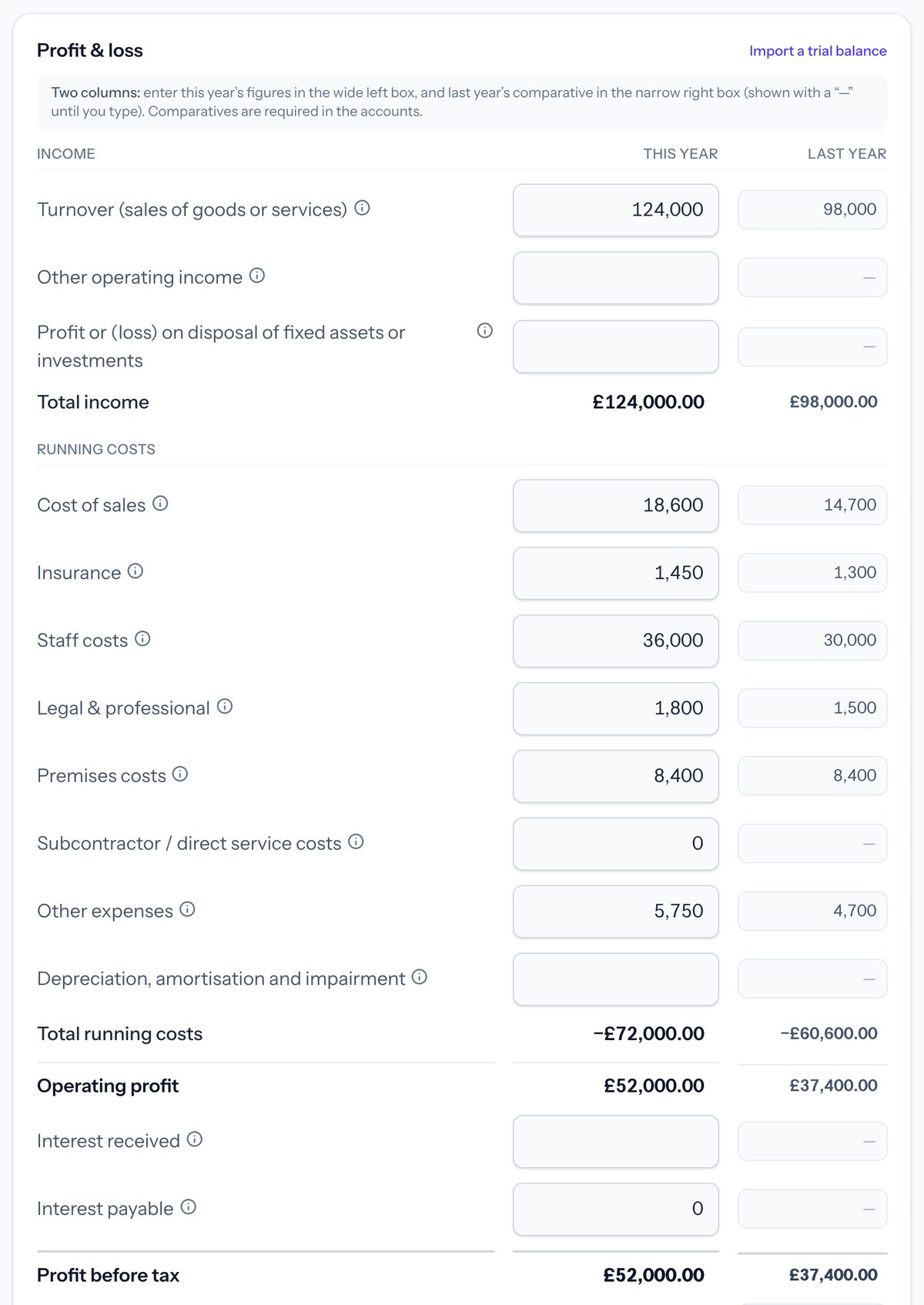 In Taxley: you enter the profit and loss figures with last year's comparatives alongside, and the totals update as you type (demo company).
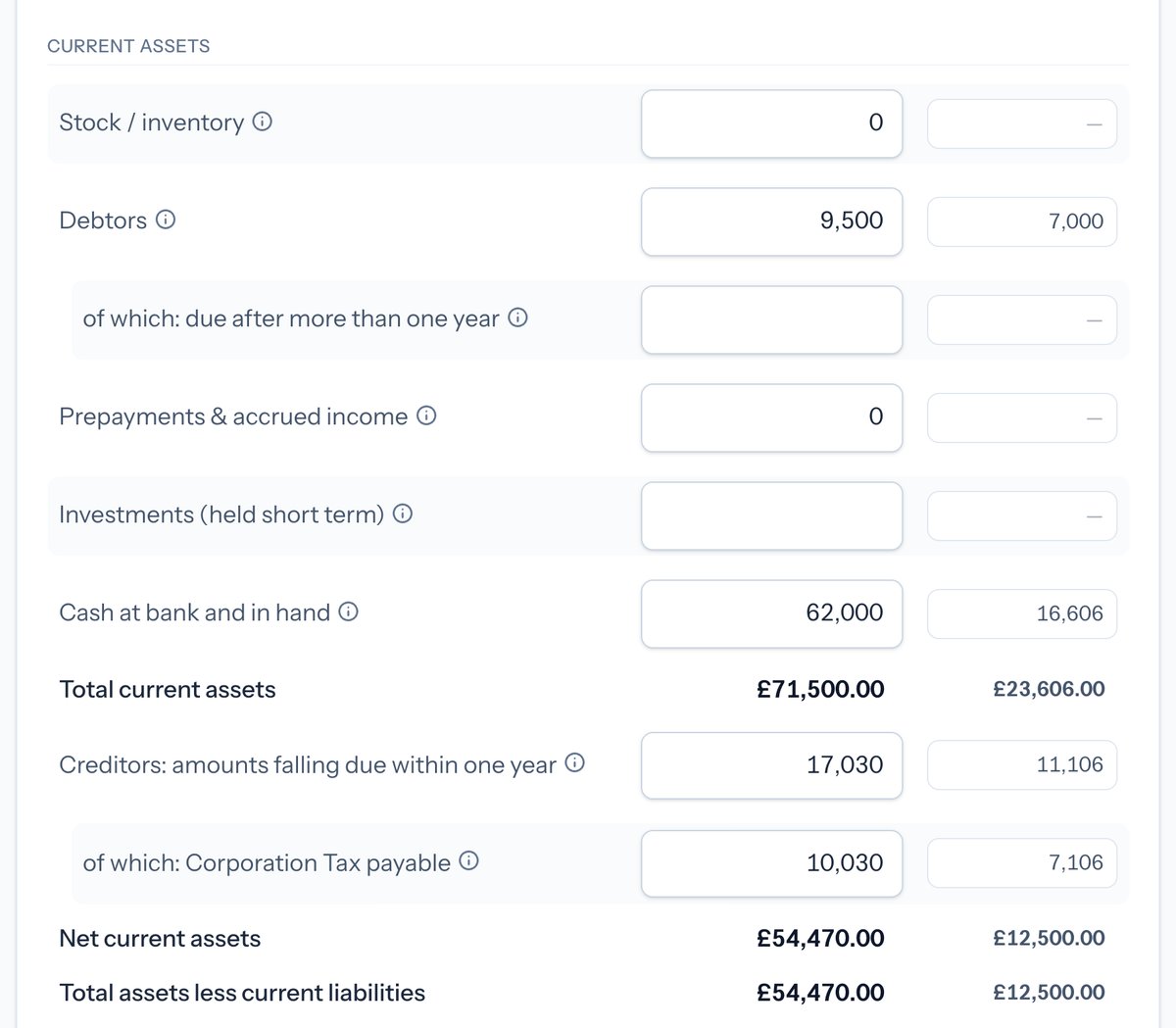 In Taxley: the balance sheet step adds up your current assets and creditors, with last year's comparatives in the right-hand column (demo company).
Step 3: Work out the Corporation Tax
Apply the rate to your taxable profit: 19% up to £50,000, 25% above £250,000, with marginal relief in between (adjusted for associated companies and short periods). Our rates and marginal relief guide shows the maths, or use the free Corporation Tax calculator to check the figure.
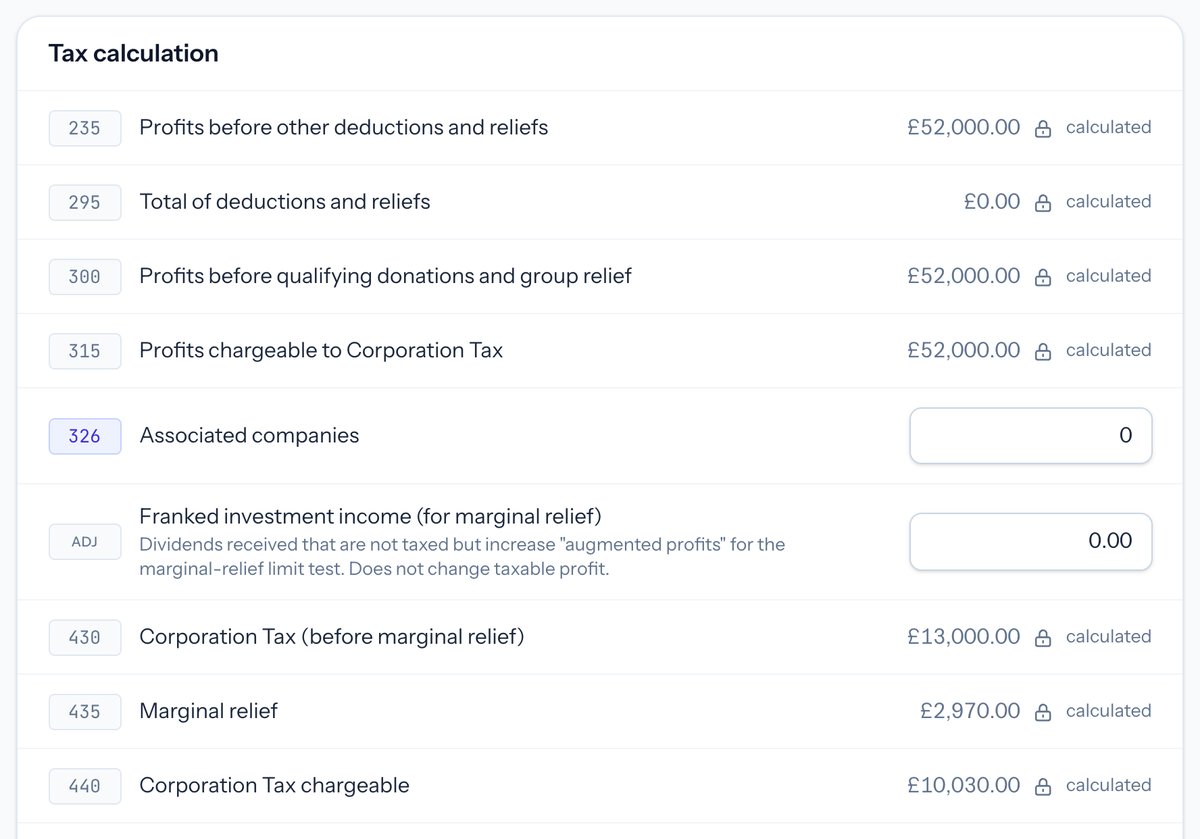 In Taxley: the tax calculation fills in the CT600 boxes, here applying marginal relief to £52,000 of profit to reach £10,030 of Corporation Tax (demo company).
Step 4: Complete the CT600 form
Enter your company details, the accounting period, turnover and the computed profit and tax into the CT600 boxes. Attach the iXBRL accounts and computations. Make the director's declaration (CT600 boxes 975/980/985) that the return is correct and complete — that responsibility is yours.
Step 5: Submit to HMRC through the Government Gateway
Sign in with your Government Gateway credentials and submit the CT600 plus accounts and computations. HMRC's transaction engine validates the submission and returns an acceptance (or a rejection with a reason). If it is rejected, fix the flagged issue and resubmit; the rejection we see most, error 1046, is a sign-in problem, covered in CT600 rejected by HMRC: how to fix error 1046.
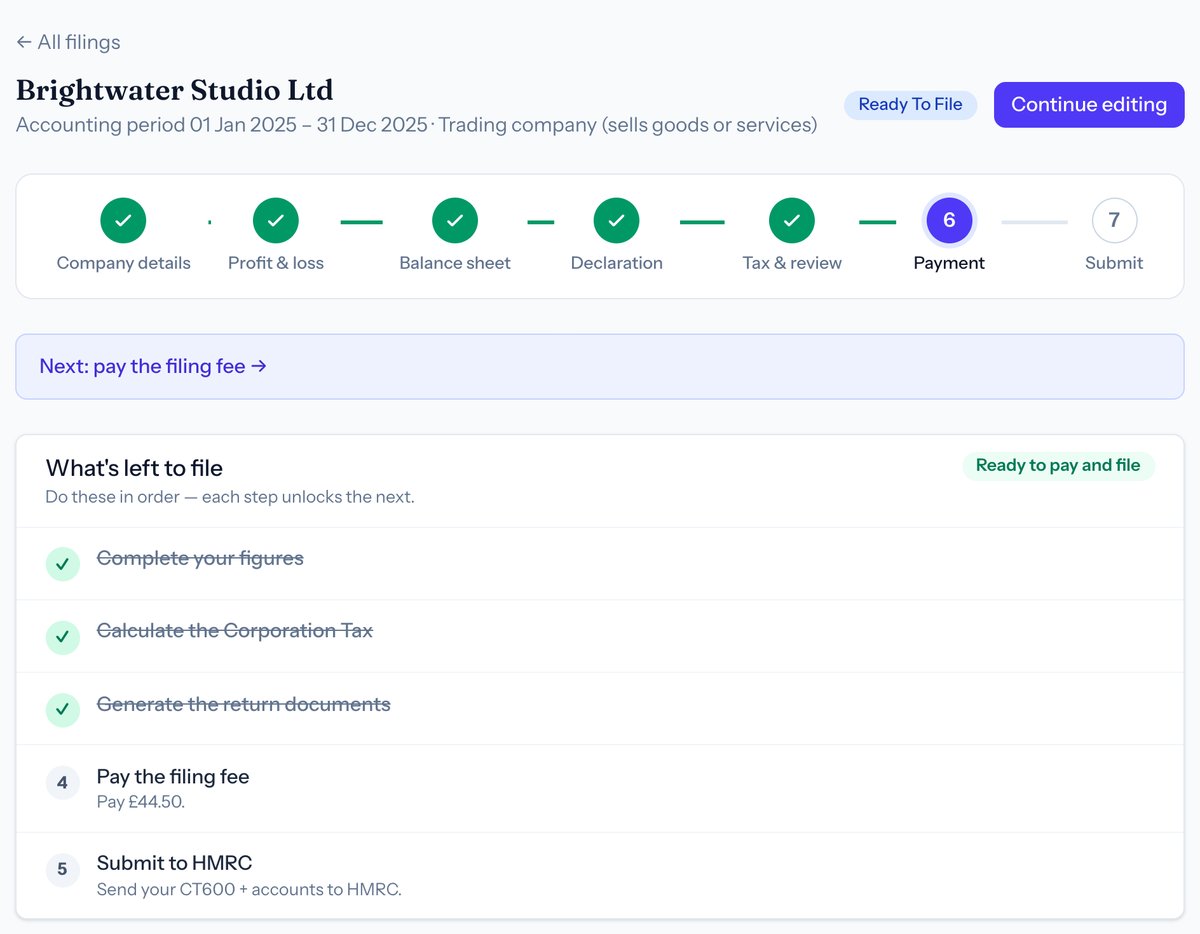 In Taxley: once the figures, tax and documents are done, the return is ready to file, and paying the fee and submitting to HMRC are the last two steps (demo company).
Step 6: Pay the tax and keep your records
Pay any Corporation Tax due by the payment deadline — 9 months and 1 day after the period ends. Paying is separate from filing: submitting the return does not pay the bill. Quote the company's 17-character Corporation Tax payment reference, because the wrong reference can delay the payment or put it against a different bill. Keep copies of everything you filed and your supporting records for at least six years.
Step 7: Check HMRC accepted your return
You have filed successfully when HMRC returns an acceptance for the submission (filing software shows this, and it appears in your HMRC online account). Filing is not complete until you see that acceptance — a saved draft is not a filed return. If HMRC sends a rejection instead, it gives the reason: fix the flagged issue and resubmit before the filing deadline. How do I know HMRC has received my CT600? explains each status and what to keep.
When should you file a CT600 yourself?
File it yourself if your company is straightforward: one trade or a property let, figures you understand, and reliefs Taxley calculates for you, such as capital allowances, chargeable gains, group relief between UK companies, a director's loan's section 455 tax or carrying a trading loss back 12 months. Get help, or check your software's limits, if your return includes any of these:
- An R&D tax relief claim for the period.
- A terminal loss claim, when a company that stops trading carries a loss back three years.
- Director's loans repaid and borrowed again soon after (bed and breakfasting).
- Foreign income outside what Taxley supports.
- Any figures you're simply not confident about.
Even when filing yourself, review your figures carefully before you file, because the declaration and their accuracy are your legal responsibility. If you're unsure which side of the line you're on, take the 30-second check to see whether Taxley fits your company; for a fuller comparison of the options, see whether you need an accountant.
How does Taxley help you file a CT600?
Taxley turns figures you enter in plain English into the CT600, FRS 105/102 iXBRL accounts and computations, then works out the tax, including marginal relief and adjustments, and files to HMRC. You review everything and pay only when you file.
Start your return and see your Corporation Tax before you pay; How to submit your Corporation Tax return online, step by step shows each stage, and what each type of filing costs is on the pricing page.
Frequently asked questions
Do I need an accountant to file a CT600?
No. There is no legal requirement to use an accountant — you can file your own Company Tax Return. The figures and the declaration are your responsibility, so review anything beyond a simple case carefully yourself.
Can I file a CT600 for free?
Not through HMRC's own service any more. HMRC's online filing service closed on 31 March 2026, and from 1 April 2026 companies should file using commercial software, an agent, or — only with a reasonable excuse or in Welsh — a paper return (GOV.UK: Closure of HMRC's file-your-accounts-and-tax-return service). Software prices vary, so compare what each product includes.
What happens if I file my CT600 late?
HMRC charges £200 once the return is late and another £200 at 3 months, then adds 10% of the tax still unpaid if the return is 6 months late (18 months after the accounting period ends), rising to 20% if it is 12 months late (2 years after the period ends) (GOV.UK: Company Tax Returns: Penalties for late filing).
Can I file a dormant company's return myself?
Yes — a dormant company files a nil CT600 and dormant accounts. It's one of the simplest returns to do yourself; see dormant company tax return.
Update history
- What you need to file a CT600 now lists the software
- Clearer scope wording; clarified the 10% and 20% late-filing penalties
- Taxley now carries losses back, files older years and amends returns
Spotted something out of date? See how we handle corrections.
People also ask
Keep reading


Ready to file your Company Tax Return?
Confirm support for your accounting period, accounts and any supplementary pages before paying. Taxley support can answer software questions, not provide a tax opinion.
Questions about your period or accounts? Ask about software support