
Help · community interest companies
How to file a community interest company’s CT600 and accounts
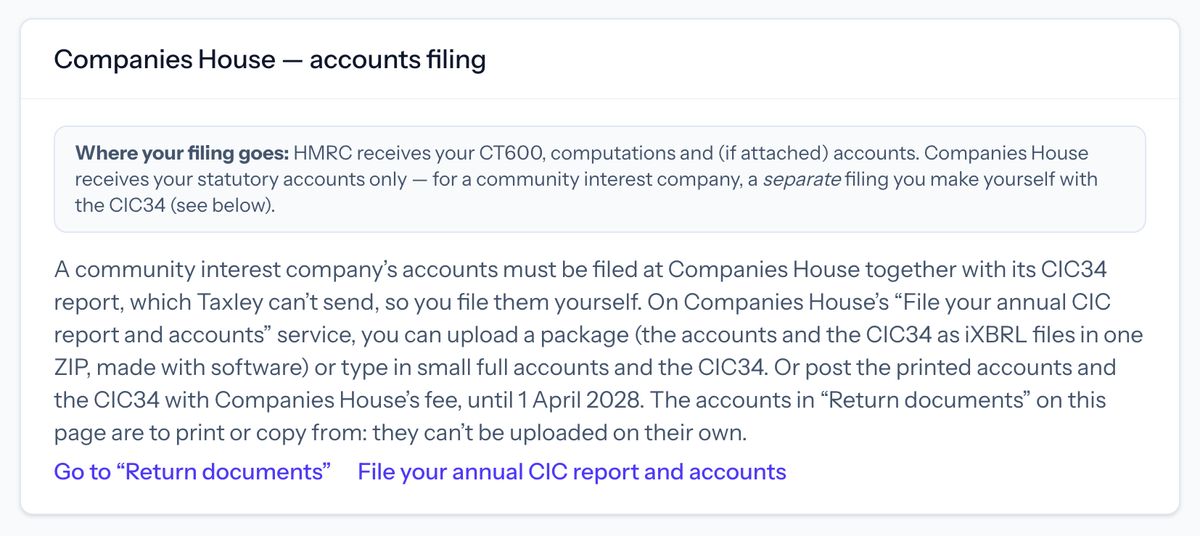
A community interest company (CIC) can use Taxley to prepare its accounts and CT600 and to file the CT600 with HMRC. Companies House needs a CIC’s accounts together with its CIC34 community interest company report, which Taxley can’t send, so you file them yourself: online on Companies House’s “File your annual CIC report and accounts” service, or by post until 1 April 2028.
Last reviewed
What does Taxley do for a CIC?
The same as for any company, up to the Companies House step:
- it prepares the company’s accounts, micro-entity (FRS 105) or small-company (FRS 102 Section 1A), from your figures;
- it works out the Corporation Tax and builds the CT600 and the tax computation;
- it files the CT600 with HMRC, using the company’s Government Gateway user ID and password.
What it doesn’t do is send the accounts to Companies House. That’s the one step you do yourself.
Why can’t Taxley file a CIC’s accounts at Companies House?
Companies House needs a CIC’s accounts together with its CIC34 community interest company report, and it doesn’t take them from filing software: a person files them, online or by post. So Taxley doesn’t send the accounts there. Instead, its “Companies House” section on the return’s page tells you what to do and links to the right places.
Taxley knows a company is a CIC from its registered name: a CIC’s name must end with “community interest company”, “CIC” or the Welsh equivalent.
How do you file a CIC’s return and accounts?
- Prepare the return and pay. Follow the step-by-step guide to filing as for any company. On the “Confirm and pay” card, Taxley reminds you that a CIC files its accounts at Companies House itself, with its CIC34 report.
- File the CT600 with HMRC. Under “HMRC submission”, enter the company’s Government Gateway user ID and password and press “File with HMRC”.
- Prepare the CIC34 report. The form and examples are on GOV.UK: CIC34: community interest company report.
- File the accounts and the CIC34 together at Companies House, in one of the three ways below.
Three ways to file a CIC’s accounts and CIC34
- Upload a package online. Taxley’s CIC pack makes the CIC34 and puts it with the accounts in one ZIP file (see below). You upload the ZIP on Companies House’s “File your annual CIC report and accounts” service. This is the only online way for micro-entity or dormant accounts.
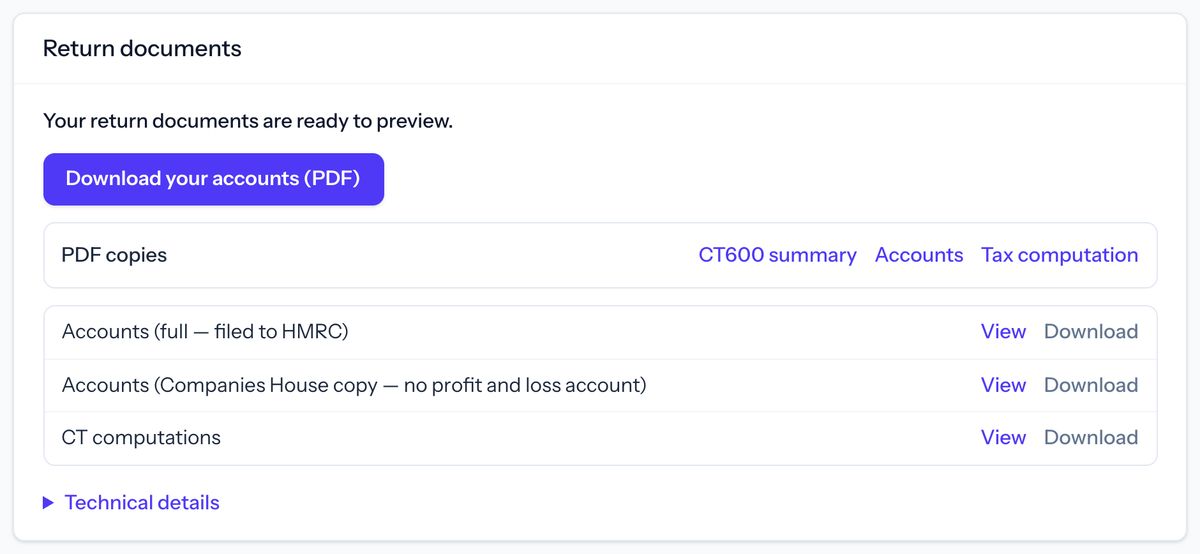
- Type small full accounts in online. On the same service, type in the CIC34 answers and a set of small full accounts yourself, using the figures in “Return documents”. Companies House’s form doesn’t take micro-entity or dormant accounts.
- Post them, until 1 April 2028. Print the accounts from “Return documents” and post them with the signed CIC34 and Companies House’s fee. From 1 April 2028, uploading a package will be the only way.
The files in “Return documents”, the PDF included, can’t be uploaded to Companies House on their own. To file online, its start page says you’ll need to sign in to (or create) a Companies House account, the company number and the company’s authentication code, and it shows any Companies House fee before you file.
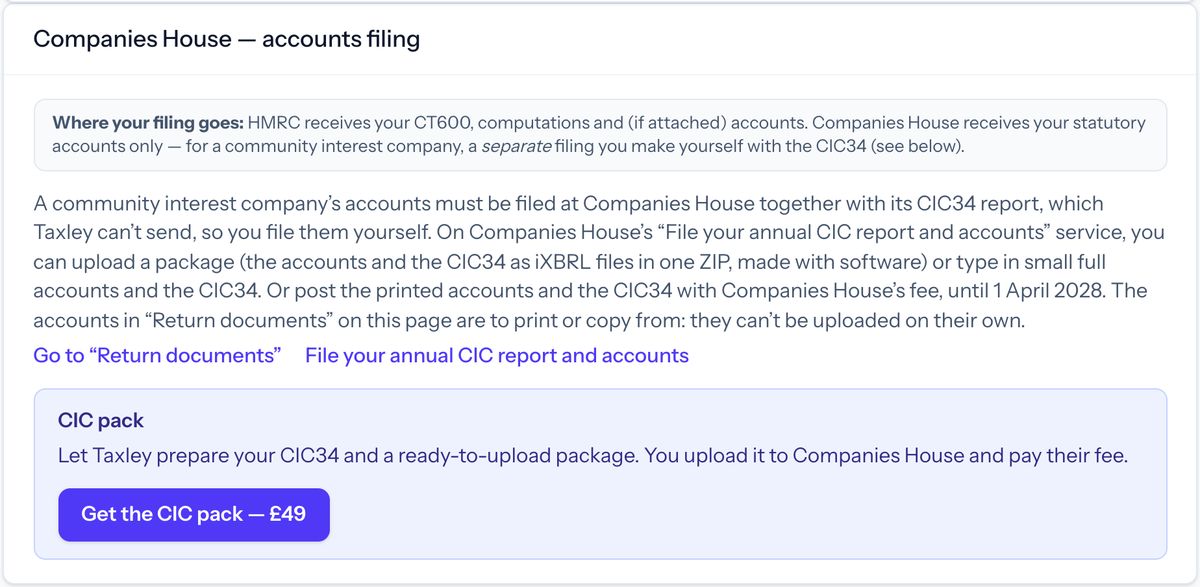
Let Taxley prepare the CIC34 and the package. Once the return is paid, the CIC pack (£49) asks a few questions, makes the CIC34, and puts it with the accounts in one ZIP file ready to upload. You upload it on Companies House’s service and pay their fee there. Find it in the return’s “Companies House — accounts filing” section, and see the steps below.
Using the CIC pack, step by step
The CIC pack makes your CIC34 and puts it with your accounts in one ZIP file. You then upload that file on Companies House’s service yourself. Companies House doesn’t take a CIC’s accounts from filing software, so Taxley can’t send them for you.
Have your company authentication code ready. Companies House asks for it when you upload the ZIP, with the company number and your Companies House sign-in. Taxley doesn’t need it for a CIC. If you can’t find it, see company authentication codes on GOV.UK.
Step 1: Open the CIC pack
On your return’s page, go to the “Companies House — accounts filing” section. In the “CIC pack” panel, press “Get the CIC pack — £49”. You can open the pack and answer its questions before the return is paid, but you can only pay for it after. Until then, the panel says “Available once your return is paid”.
Step 2: Check your answers and save them
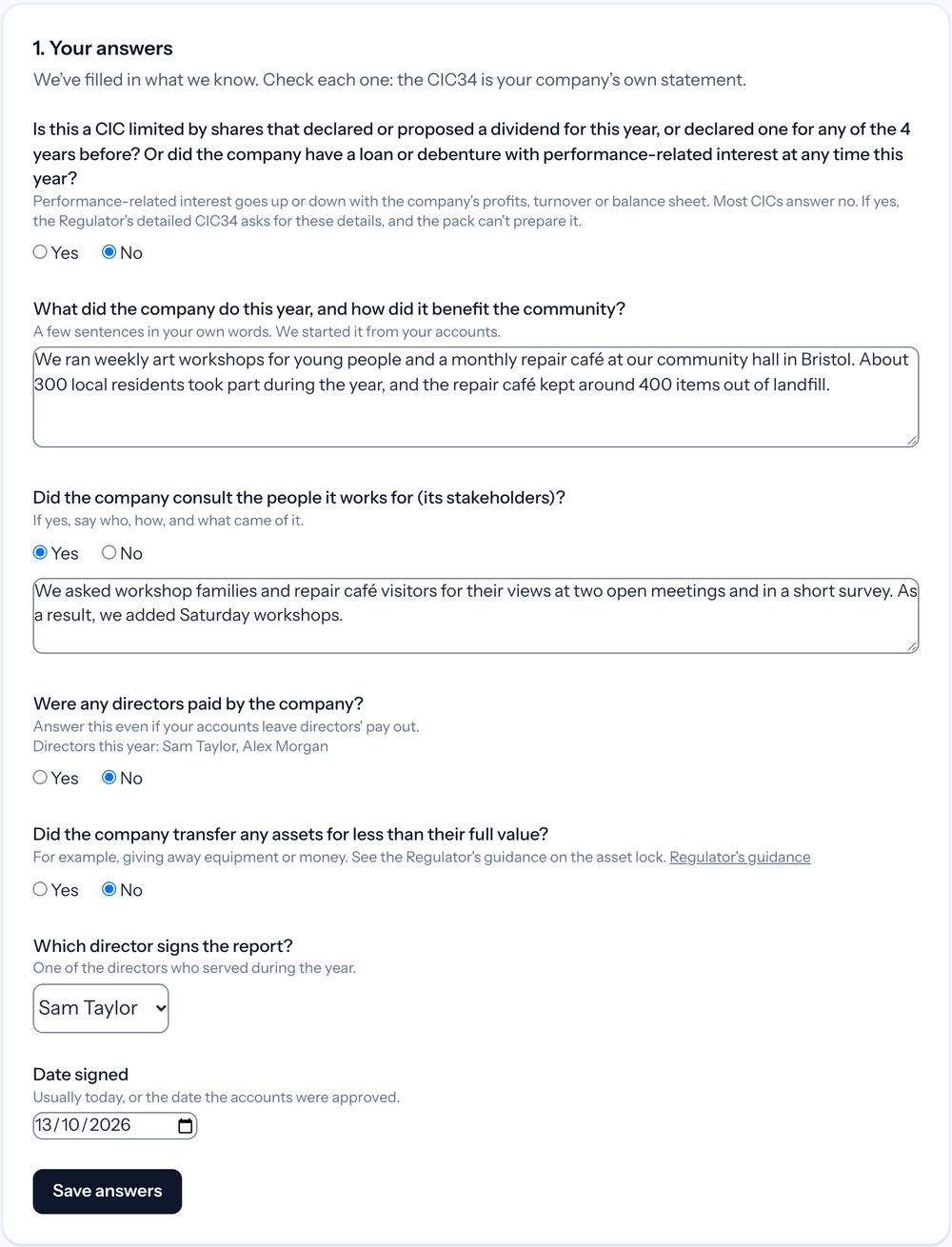
Under “1. Your answers”, Taxley fills in what it already knows: what the company does, from your accounts, and the directors. Check each answer and change it if you need to. The CIC34 is your company’s own statement. The questions are:
- whether the company had dividends or performance-related interest (most CICs answer no; if yes, the pack can’t prepare your report and you aren’t charged);
- what the company did this year, and how it benefited the community;
- whether it consulted the people it works for (its stakeholders);
- whether any directors were paid;
- whether it transferred any assets for less than their full value;
- which director signs the report, and the date.
Then press “Save answers”.
Step 3: Check your CIC34
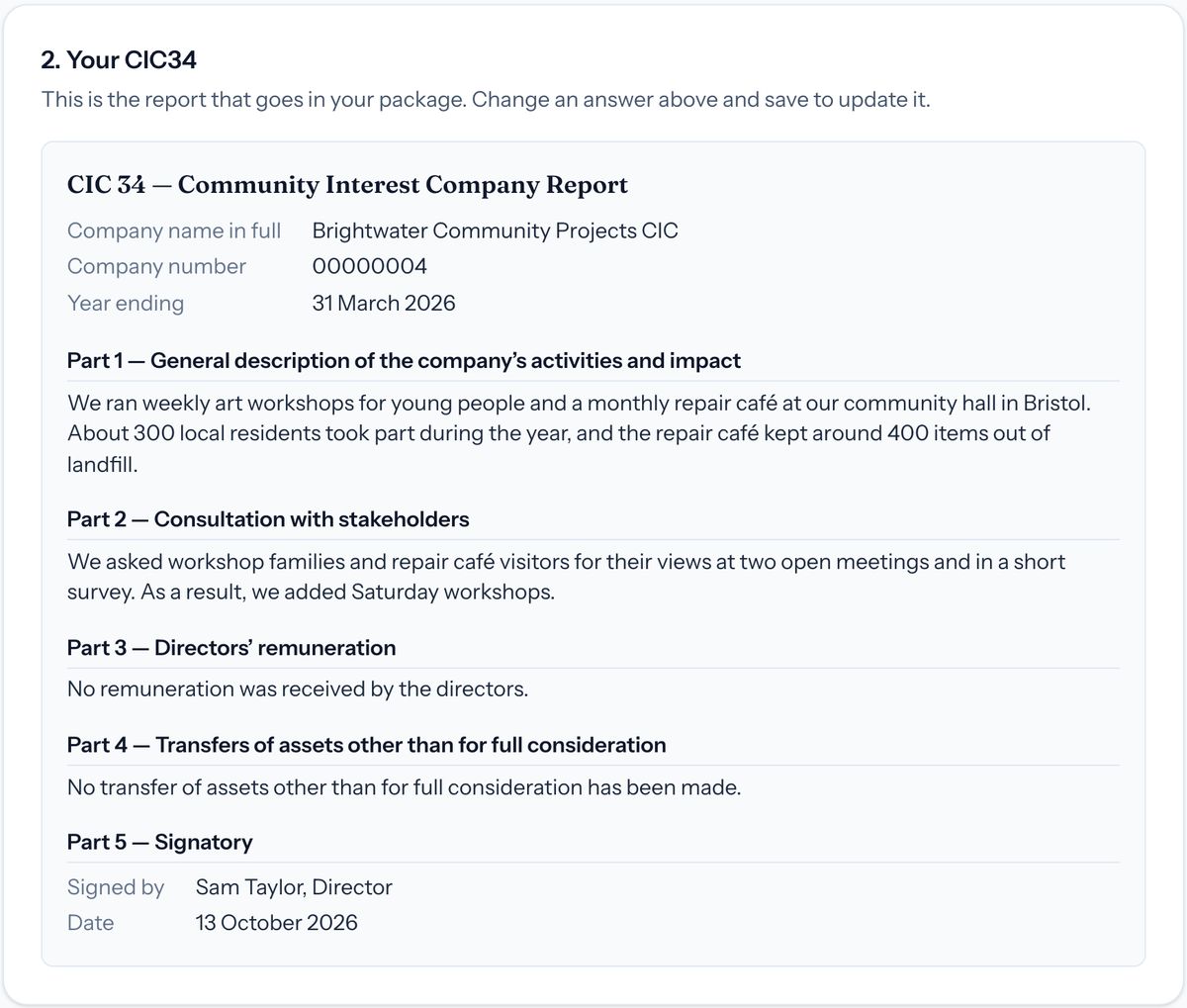
“2. Your CIC34” shows the report as it will go in your package. The company name, company number and year end come from your return, so they match your accounts. To change the report, change an answer above and press “Save answers” again.
Step 4: Pay for the pack
Under “3. Pay £49”, press “Pay £49” and pay by card. Stripe takes the payment. The button works once the return is paid and its accounts are final.

Step 5: Download your files
Once you’ve paid, “Your CIC pack is ready” shows two buttons. “Download package (ZIP)” is the file you upload to Companies House. “Download CIC34 (PDF)” is a copy to print and keep. To see your receipt, press “View your receipt”. It’s also under “Orders & receipts” in the menu.
Your answers are fixed after the first download. Check them before you download. If something needs changing after that, contact support.

Step 6: Upload the ZIP at Companies House
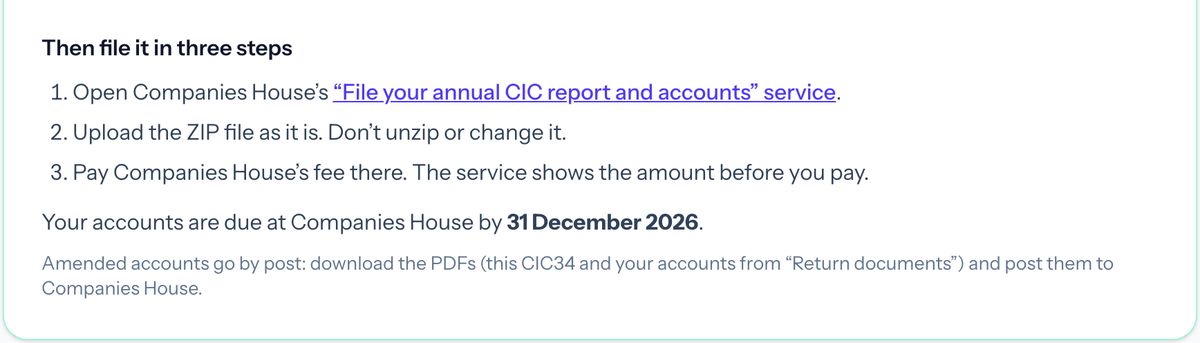
Open Companies House’s “File your annual CIC report and accounts” service. Sign in to your Companies House account and enter the company number and authentication code. Upload the ZIP file as it is: don’t unzip it or change it. Then pay Companies House’s fee there. The service shows the amount before you pay. The pack page also shows when your accounts are due at Companies House.
More about the CIC34 and the package is in our guide: how to file CIC accounts and a CIC34.
What does a CIC pay Taxley?
The same as any other company for the same accounts: see prices. The fee covers preparing the accounts and the CT600 and filing the CT600 with HMRC. Because Taxley doesn’t send a CIC’s accounts to Companies House, the checkout page doesn’t list Companies House filing for a CIC.
The optional CIC pack is £49 for each set of accounts, paid after the return. Companies House’s own fee is paid to them.
More official guidance for CICs is on GOV.UK: community interest companies: forms and step-by-step guides.
Questions people ask
Does Taxley file a CIC’s CT600 with HMRC?
Yes. A CIC’s Company Tax Return is prepared and filed like any other company’s: Taxley works out the tax, builds the CT600 and sends it to HMRC with the company’s Government Gateway sign-in.
Does Taxley need the Companies House authentication code for a CIC?
No. Taxley doesn’t send a CIC’s accounts to Companies House, so it doesn’t ask for the code. You’ll need it if you file online on Companies House’s CIC service.
How does Taxley know the company is a CIC?
From its registered name. A CIC’s name must end with one of the legal CIC endings, such as “community interest company”, “CIC”, “community interest plc” or a Welsh equivalent, so Taxley shows the CIC steps when it sees one of them.
Does a CIC pay more to use Taxley?
No. A CIC pays the same as any other company for the same accounts. Because Taxley doesn’t file a CIC’s accounts at Companies House, checkout doesn’t list Companies House filing for it.
Prepare your CIC’s return
Preparing is free. You pay only when you file the CT600.