
CT600 tick boxes 38 to 75: when to tick each one in 2026

Prerequisites at a glance
- Time
- About 5 min
- Difficulty
- Beginner
- Tools you'll use
-
- Taxley's return editor (Advanced view)
- Have ready
-
- Details of any return already filed for the period
- Any repayment or earlier-period claim
- The group's turnover and staff numbers
- Any scheme reference number
In short: Tick a CT600 box from 38 to 75 only when its statement is true for this return, and leave the rest blank, so a small company filing one 12-month return with final figures normally ticks none of boxes 38 to 70. The boxes flag a repayment (40), a claim for an earlier period (45), several returns at once (50), estimated figures (55), a group that is not small (60), a tax-avoidance scheme (65) and transfer pricing (70 and 75) (HMRC's CT600 guide); Taxley also shows the new-or-amended choice as box 38.
This guide is the deep dive on those "About this return" tick boxes: for each one, a one-line test for when to tick it, an example and what Taxley does next. For what goes in every other box on the form, from turnover to the declaration, use our CT600 box-by-box reference; for the return as a whole, read what a CT600 is and how to file one.
What are CT600 boxes 38 to 75?
Boxes 38 to 75 sit in the "About this return" section at the top of the CT600, straight after the return period in boxes 30 and 35. Each one is a yes-only tick: you tick it when the statement applies to the company and leave it blank when it doesn't. None of them holds an amount of money.
Box 38 is not printed on the current paper form. The CT600 (2026) Version 3 form, updated by HMRC on 1 April 2026, starts its tick boxes at box 40, and HMRC's box-by-box guide (last updated 2 June 2026) has no entry for box 38. An online return is sent to HMRC marked either as a new return or as an amended one, and some filing software, Taxley included, shows that choice as box 38. No box in the range has been withdrawn: boxes 40 to 75 all appear on the 2026 form, and every one has an entry in HMRC's guide.
Which boxes does a typical small company tick in 2026?
A typical small company with one 12-month accounting period, final figures and no special dealings with connected businesses ticks none of boxes 38 to 70. Box 75 is different: it confirms the transfer-pricing exemption for small and medium-sized enterprises, and HMRC's guide asks an eligible company to confirm it with an X.
| Box | What it means | Tick it if… | Typical small company |
|---|---|---|---|
| 38 | This return amends or replaces one already made | You're correcting a return HMRC already holds for the period | No |
| 40 | A repayment is due for this period | The company paid more tax for the period than the return shows | Only if it overpaid |
| 45 | Claim or relief affecting an earlier period | A claim in this return cuts an earlier period's tax, such as a loss carry-back | Rarely |
| 50 | Making more than one return now | You're filing two or more returns for the company at the same time | Long first period or catching up |
| 55 | Return contains estimated figures | A figure is an estimate you couldn't finalise | No |
| 60 | Company part of a group that is not small | Its group fails the Companies Act small-group test | No |
| 65 | Notice of disclosable avoidance schemes | It has a scheme or promoter reference number to report | No |
| 70 | Compensating adjustment claimed (transfer pricing) | It claims to match a connected UK business's arm's-length adjustment | No |
| 75 | Qualifies for the transfer-pricing SME exemption | It is a small or medium-sized enterprise for transfer pricing | Usually qualifies |
Box numbers and wording checked on 29 September 2026 against the CT600 (2026) Version 3 form and HMRC's CT600 guide.
How do you fill in "Anything unusual about this return?" in Taxley?
In Taxley, boxes 38 to 75 form one section of the Advanced view, headed "Anything unusual about this return?" with the line "Most returns tick none of these — CT600 boxes 38–75". Open it with Show, tick any statement that applies and leave the rest blank. The four steps below take about five minutes.
Step 1: Open the section in the Advanced view
The tick boxes appear only in the Advanced view of the "Prepare your Corporation Tax return" page. Scroll to "Anything unusual about this return?" and select Show. The nine statements appear as tick boxes, each followed by its CT600 box number, and the ? beside the heading opens this guide in a new tab. The Simple view doesn't show the tick boxes: it lists any ticked ones under "Also on this return", with a "Change these in Advanced" link.
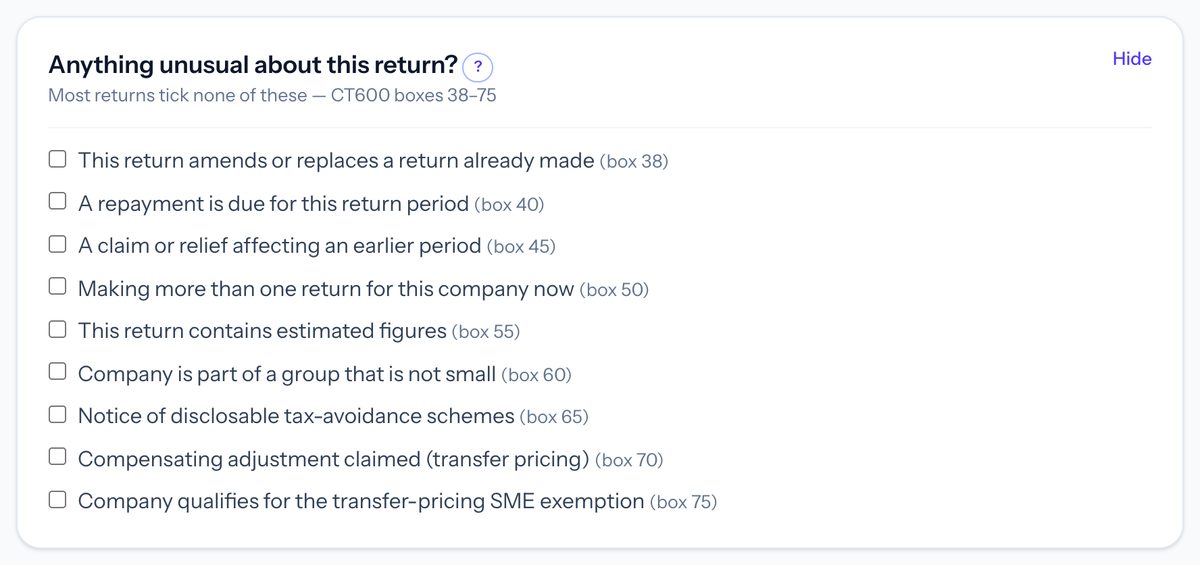 In Taxley: the section lists boxes 38 to 75 as nine tick boxes, and most returns tick none of boxes 38 to 70 (demo company).
Step 2: Tick only the statements that apply
Read each statement against the one-line tests in this guide and tick only those that are true for this return. Leave the rest blank, because an unticked box isn't sent to HMRC. Whatever you tick applies to every CT600 in the filing, including both returns for a period of account longer than 12 months.
Step 3: Add what each tick needs elsewhere
Some ticks need something outside this section. For box 40, enter the company's bank details in the separate "Repayment bank details" section. For box 55, keep a note of why each figure is estimated and when you expect the final figure. For box 45 or box 65, the claim or the CT600J page has to come from outside Taxley, so Taxley can't file it yet if either applies.
Step 4: Check the combinations HMRC rejects before you pay
Before you pay, check the two combinations that HMRC's own validation rejects: box 65 on a new return, which needs form CT600J, and boxes 70 and 75 ticked together. Taxley stops both before payment and lists them as "Return information tick HMRC won't accept". Then save the return. The ticks don't change any figure, so the tax calculation, accounts and computations stay exactly as they were.
When do you tick box 38 for an amended return?
Tick box 38 only when the return corrects or replaces a Company Tax Return HMRC already holds for the same period. You must usually make amendments within 12 months of the filing deadline, using commercial software or by writing to HMRC (GOV.UK: making changes). The first return you file for a period is always a new return.
Tick it if the return replaces one already filed. Example: the company filed its return for the year to 31 March 2026 in September 2026, then found a £2,000 supplier invoice counted twice.
In Taxley, you don't tick box 38 yourself. On a return Taxley filed and HMRC accepted, press "Amend this return": Taxley copies the return, you correct the figures, and it sends the whole return marked "amended" instead of "new". Every figure must be the corrected, complete figure, not just the change, and "See what changed" compares it with the accepted return. Before you rely on it, read how to correct a CT600 after filing, which covers the time limit and the evidence to keep.
When do you tick box 40 because a repayment is due?
Tick box 40 when you think HMRC owes the company money back for this period, usually because it paid more Corporation Tax than the return now shows. HMRC's guide says bank or building society details in boxes 920 to 940 speed the repayment up (HMRC's CT600 guide).
HMRC repays an overpayment of more than £100 automatically, and one of £100 or less only when the return gives bank details; without them, it sets a small repayment against later accounting periods. It asks for bank details on every return, whether or not a repayment is expected, and uses only the details from the latest return. If the company paid its tax by debit or credit card, HMRC may repay to the card instead.
Tick it if the company overpaid for this period. Example: it paid £12,000 on account for the year to 31 March 2026, and the finished return shows £10,030 due, so £1,970 is owed back.
In Taxley, the tick doesn't ask for bank details. You enter them in the separate "Repayment bank details" section, labelled "Optional — only if you’re owed a refund. CT600 boxes 920–945. Leave blank for a normal return." Taxley sends the bank details only when you give all four of the name on the account, sort code, account number and bank name. Box 945 and the nominee fields are only for paying someone other than the company. Taxley's hint says to leave them blank for a normal return, but HMRC's guide asks for bank details on every return, so filling them in does no harm.
When do you tick box 45 for a claim affecting an earlier period?
Tick box 45 when this return makes a claim that reduces the company's Corporation Tax for an earlier period. The usual example is carrying a trading loss back against the previous 12 months' profits, and GOV.UK's loss guidance says a claim like that made in the return needs the box ticked (GOV.UK: claiming a loss).
Tick it if a claim in this return lowers an earlier period's tax. Example, from GOV.UK's own guidance: a company makes an £8,000 trading loss and carries it back against £20,000 of profit in the earlier 12 months, cutting that profit to £12,000.
In Taxley, a 12-month trading loss carry-back is worked out on the loss-making period's return and box 45 is ticked for you. Taxley doesn't handle terminal loss claims (on ceasing to trade) or a carry-back from a period of account longer than 12 months. Taxley files nothing for the earlier period: HMRC repays or sets off its tax. GOV.UK says a carry-back claim can be made in the return, in an amendment or in a letter, so check which route suits the company before ticking box 45.
When do you tick box 50 for more than one return?
Tick box 50 when you are making more than one Company Tax Return for the company at the same time. For a small company the common case is a first set of accounts longer than 12 months: a Corporation Tax accounting period can't be longer than 12 months, so you may have to file 2 returns (GOV.UK: first accounts).
Tick it if you're filing two or more returns together. Example: the first accounts run from 1 October 2024 to 31 March 2026, so the company files a return for the 12 months to 30 September 2025 and another for the 6 months to 31 March 2026. Filing two overdue years in one sitting counts too.
In Taxley, a period of account over 12 months is split into two accounting periods automatically, and Taxley builds a CT600 for each from one set of accounts. It sends the second return once HMRC accepts the first. Taxley ticks box 50 itself on both returns, and shows it ticked and greyed out with the note "Ticked by Taxley: this period is longer than 12 months, so Taxley files two returns for it together." Any other ticks you choose go on both returns. Our guide to first accounts and two CT600 returns explains the split.
When do you tick box 55 for estimated figures?
Tick box 55 if any figure in the return is an estimate. HMRC's manual expects final figures in almost every return, but accepts estimates where a company can't finalise a figure despite its best efforts, for example while it waits for a valuation or for information from a third party (HMRC manual CTM93280).
The same manual page sets three conditions for an estimate. The company must explain why it had to estimate, say when it expects the final figure (or why it can't say), and replace the estimate with an accurate figure as soon as possible. An estimate that turns out not to be a reasonable best estimate can lead to a penalty where HMRC can show fault, and general words such as "information to follow" don't count as a figure at all.
Tick it if a figure is your best estimate, not a final one. Example: the company is still waiting for its landlord's final service-charge bill and uses its best estimate of £4,000.
In Taxley, the tick is sent, but Taxley has no box for the explanation HMRC's manual expects and doesn't remind you later. When the final figure arrives, file an amended return (box 38) within 12 months of the filing deadline.
When do you tick box 60 for a group that is not small?
Tick box 60 if the company is a member of a group that is not small under the Companies Act 2006. Whether a group is small depends on its turnover, balance sheet total and staff numbers, and the limits rose for financial years beginning on or after 6 April 2025.
For a group whose parent's financial year began before 6 April 2025, the group is small if it meets two of: turnover of not more than £10.2 million net (£12.2 million gross), a balance sheet total of not more than £5.1 million net (£6.1 million gross) and not more than 50 employees (HMRC EM1513).
Box 60 matters because it changes how long HMRC has to open an enquiry. For a member of a group that is not small, the time limit for an enquiry into an on-time return runs 12 months from the statutory filing date; for other companies it runs 12 months from the date HMRC received the return (HMRC manual EM1510). For financial years beginning on or after 6 April 2025, the turnover and balance sheet limits rise to £15 million net (£18 million gross) and £7.5 million net (£9 million gross) (section 383; SI 2024/1303).
Tick it if the company's group fails two of the three limits in this year and the year before (section 383(3); a group in its first year tests that year alone). Example: the company is a subsidiary of a group with £40 million turnover and 300 staff. A standalone company with no parent or subsidiaries isn't in a group and leaves box 60 blank.
In Taxley, the tick is sent as it stands and changes no calculation. Box 60 is a different question from the number of associated companies in box 326.
When do you tick box 65 for a disclosable tax-avoidance scheme?
Tick box 65 if the company must disclose that it has used or is using a tax-avoidance scheme, or if a monitored promoter (or a client of one) has given it a promoter reference number. The scheme details then go on supplementary page CT600J, which box 140 says is attached (HMRC's CT600 guide).
Under the disclosure of tax avoidance schemes (DOTAS) rules, a company that is party to notifiable arrangements receives an 8-digit scheme reference number (SRN). It reports the SRN on form CT600J (boxes J5 to J50) with the end of the accounting period in which it expects the tax advantage (GOV.UK: CT600J). If the return is late, or was filed without the SRN, the number goes on form AAG4 instead (GOV.UK: DOTAS forms). Failing to report an SRN can cost £5,000 per scheme, rising to £7,500 or £10,000 per scheme for earlier failures within 36 months.
Tick it if the company holds an SRN or promoter reference number for arrangements it expects to reduce its tax in this or a later period.
In Taxley, Taxley doesn't prepare form CT600J, and HMRC's online validation rules reject a new return that ticks box 65 without box 140. Taxley stops a new return with box 65 ticked before payment and explains that it can't file this yet, or that you should untick box 65 if there is no disclosable scheme.
What do transfer pricing boxes 70 and 75 mean?
Boxes 70 and 75 relate to the UK transfer pricing rules in Part 4 of the Taxation (International and Other Provisions) Act 2010 (TIOPA 2010). When connected businesses deal with each other on terms independent businesses wouldn't agree, and that gives a UK tax advantage, profits are taxed as if an arm's-length price had been used (section 147).
Small and medium-sized enterprises are normally exempt (section 166). HMRC's guide describes an SME as a group employing fewer than 250 people worldwide with global turnover under 50 million euros (£34 million), a balance sheet total under 43 million euros (£29 million), or both. The exemption doesn't apply if the company elects out, or to deals with residents of territories without a suitable tax treaty (section 167), and HMRC can give a medium-sized enterprise a transfer pricing notice (section 168). In November 2025 the government confirmed that SMEs keep the exemption (GOV.UK consultation outcome).
Box 70: tick it if the company claims a compensating adjustment. That arises when a connected UK business has raised its own taxable profits to an arm's-length figure for a deal with your company; your company, the disadvantaged side, may then claim to be taxed on the same basis (section 174). Example: your company borrowed £200,000 interest-free from a connected UK company too large for the exemption, which adds arm's-length interest to its profits, and your company claims the matching deduction.
Box 75: tick it if the company qualifies for the SME exemption, as HMRC's guide asks you to confirm. Example: a company with 12 staff and £400,000 turnover that isn't part of a larger group. The exemption comes from section 166 itself, not from the tick.
In Taxley, both ticks are sent as HMRC's transfer pricing indicators, and Taxley doesn't calculate arm's-length adjustments. HMRC's validation rules say boxes 70 and 75 can't both be completed, so Taxley stops a return with both ticked before payment and asks you to untick the one that doesn't apply.
Does any tick stop Taxley filing the return?
Two combinations do, because HMRC's own validation rejects them, and Taxley stops them before you pay: box 65 on a new return, which HMRC only accepts with form CT600J giving each scheme's reference number (Taxley can't file CT600J, so it can't file that return yet), and boxes 70 and 75 ticked together. Every other tick in boxes 38 to 75 goes to HMRC as it stands, with no Taxley warning or blocker.
Box 38 changes only whether the return is sent as new or amended. If your return needs none of the unusual cases, start your return in Taxley from your own figures, or take the 30-second check to see whether Taxley fits your company.
Frequently asked questions
Is box 38 on the paper CT600 form?
No. The CT600 (2026) Version 3 form starts its "About this return" tick boxes at box 40, and HMRC's box-by-box guide has no box 38. An online return carries the new-or-amended choice in the return itself, and some filing software labels that choice box 38.
Do I need to tick box 40 to get a refund?
HMRC asks for box 40 or box 45 to be ticked so it knows a repayment may be due. It repays overpayments over £100 automatically, and £100 or less only when bank details are on the return; otherwise it sets the amount against later periods.
What happens if estimated figures turn out wrong?
HMRC's manual says estimates must be reasonable and replaced with accurate figures as soon as possible. An estimate that wasn't a genuine best estimate can lead to a penalty where HMRC can show fault, so correct it with an amended return once the final figure is known.
Is a standalone company part of a group that is not small?
No. Box 60 is about the group a company belongs to, so a company with no parent or subsidiary companies leaves it blank. A subsidiary of a group that exceeds two of the three Companies Act limits, in this year and the year before, ticks it.
What is a scheme reference number?
An SRN is the 8-digit number given for arrangements disclosed under the DOTAS rules. A company expecting a tax advantage from those arrangements reports it on form CT600J with its return, or on form AAG4 if the return is late or left it out.
Will ticking box 75 reduce the company's tax?
No. Box 75 only confirms that the company qualifies for the transfer-pricing exemption for small and medium-sized enterprises. The exemption itself comes from section 166 of TIOPA 2010, and the tick changes no figure in the return or in the tax calculation.
Update history
- Refocused on when to tick each box; links the full box reference
Spotted something out of date? See how we handle corrections.
People also ask
Keep reading


Ready to file your Company Tax Return?
Confirm support for your accounting period, accounts and any supplementary pages before paying. Taxley support can answer software questions, not provide a tax opinion.
Questions about your period or accounts? Ask about software support