
Company accounts comparatives: how to enter last year's figures

Prerequisites at a glance
- Time
- About 20 min
- Difficulty
- Beginner
- Tools you'll use
-
- Taxley's Advanced editor
- Companies House Find and update company information
- Have ready
-
- Last year's signed accounts
- Last year's profit and loss account
- Last year's balance sheet
In short: Company accounts must show last year's figure beside every item in this year's balance sheet and profit and loss account. These are the "comparatives", and only a company's first accounts have none. Copy them from last year's signed accounts, because the comparatives must match the accounts already approved and filed, and HMRC receives this year's accounts as part of your Company Tax Return.
This guide explains the rule first, then the exact boxes in Taxley's editor, using a fictional demo company, Brightwater Design Ltd, with a year to 31 March 2026. Not using Taxley yet? Take the 30-second check to see whether Taxley fits your company.
What are comparative figures in company accounts?
Comparative figures are last year's amounts printed beside this year's, so a reader can see what changed. The law requires them: for every item in the balance sheet or profit and loss account, "the corresponding amount for the immediately preceding financial year must also be shown" (SI 2008/409, Schedule 1, paragraph 7).
The rule covers micro-entity accounts too. Schedule 1 to the Small Companies and Groups (Accounts and Directors' Report) Regulations 2008 sets the formats for a small company's accounts, and a micro-entity uses its shorter Section C formats (paragraph 1). The comparatives rule sits in the same Schedule's general rules, so even a short micro-entity balance sheet has two columns. If last year's amount isn't comparable, it may be adjusted, with a note explaining why (paragraph 7(2)).
Comparatives also reach the Company Tax Return. GOV.UK says statutory accounts go to HMRC "as part of your Company Tax Return" (GOV.UK: prepare annual accounts), so the accounts attached to a CT600 carry last year's column too. In Taxley, a return that includes accounts can't be filed until last year's figures are entered and last year's balance sheet balances, or until you have said there is no earlier year.
Does a company's first accounting period need comparatives?
No. A company's first accounts have no comparatives, because there is no earlier financial year to compare them with. The first financial year begins with the first day of the first accounting reference period (Companies Act 2006, section 390), and that period begins on the date of incorporation.
First accounts that run for more than 12 months are still the company's first accounts. A first accounting reference period lasts more than six months but not more than 18 months, starting on the incorporation date (section 391(5)). GOV.UK says first accounts "usually cover more than 12 months", but a Corporation Tax accounting period can't, so you may file two CT600 returns for one set of first accounts (GOV.UK: first accounts and Company Tax Return). Those first accounts still have no last-year column. First company accounts: why you may need two CT600s explains how to split the periods.
Every later set of accounts needs comparatives, including a dormant company's. Taxley reads the incorporation date from Companies House and treats a period starting on that date as the first. For long first accounts, enter the whole period from incorporation as one return: Taxley splits it into two Corporation Tax periods. If your return starts after incorporation but the accounts are still the company's first, answer "Yes — there's no earlier year".
Where do you find last year's figures?
Take last year's figures from the company's last signed accounts, either your own copy or your accountant's. Those accounts hold the full profit and loss account and balance sheet. Companies House is a useful cross-check for the balance sheet, but for a small company it often holds no profit and loss account at all.
Filed accounts are free to view: GOV.UK lists "document images" among the free company details (GOV.UK: get information about a company). On Find and update company information, search for the company, open Filing history, filter by Accounts and choose View PDF. Expect only a balance sheet: a small company can "choose whether or not to send" its profit and loss account, and a micro-entity can "send only your balance sheet" (GOV.UK: micro-entities, small and dormant companies). Last year's profit and loss comes from your own copy or your accountant.
Taxley fills in some figures for you. If your previous Taxley return covers the period just before this one, "Last year's figures are carried over from your previous Taxley return." and can't be changed here. Otherwise Taxley may fill last year's empty balance-sheet boxes from the accounts filed at Companies House when you first open the return, with a green notice asking you to "please check each figure" and an Undo button. The profit and loss is yours to copy.
How do you enter last year's figures in Taxley, step by step?
Answer the first-period question, copy last year's profit and loss and balance sheet into the narrow "Last year" boxes, and make this year's retained earnings brought forward equal last year's closing figure. Then check that the amber message under last year's balance sheet has gone. Keep last year's signed accounts open beside the editor while you work.
Step 1: Answer "Is this the company's first accounting period?"
The question sits at the top of Profit & loss, or at the top of the Balance sheet for a dormant company. For any year after the first, choose "No — I'll enter last year's figures". Taxley then reminds you: "Enter last year's figures in the "Last year" column below — the accounts must show them." Choose "Yes — there's no earlier year" only for the company's first accounts. Taxley then shows "No comparatives needed for a first period." and dims the "Last year" boxes.
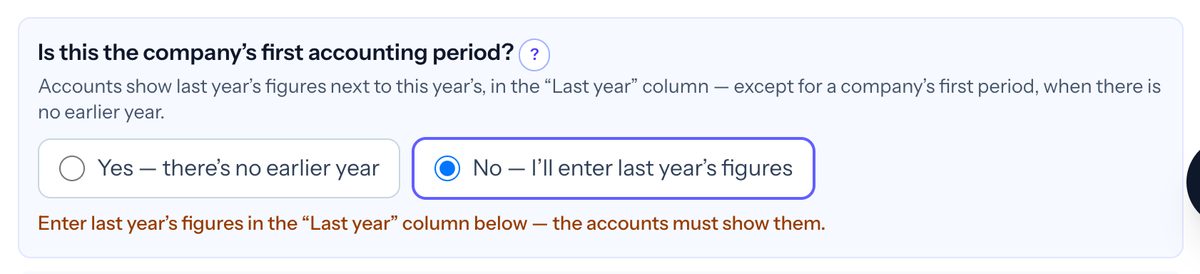 In Taxley: answering No turns on the "Last year" column and adds a reminder that the accounts must show it (demo company).
Step 2: Enter last year's profit and loss
Each row has a wide box for this year and a narrow box on the right for last year, which shows "—" until you type. Copy each line of last year's profit and loss account into the matching row. For its year to 31 March 2025, Brightwater Design Ltd had turnover of £98,000, cost of sales of £20,000, staff costs of £30,000 and other expenses of £8,000, so its profit before tax was £40,000. Enter Tax on profit (£7,600 here) and any Dividends paid in the last-year boxes. Tick "None (£0)" only if last year's tax charge really was nil.
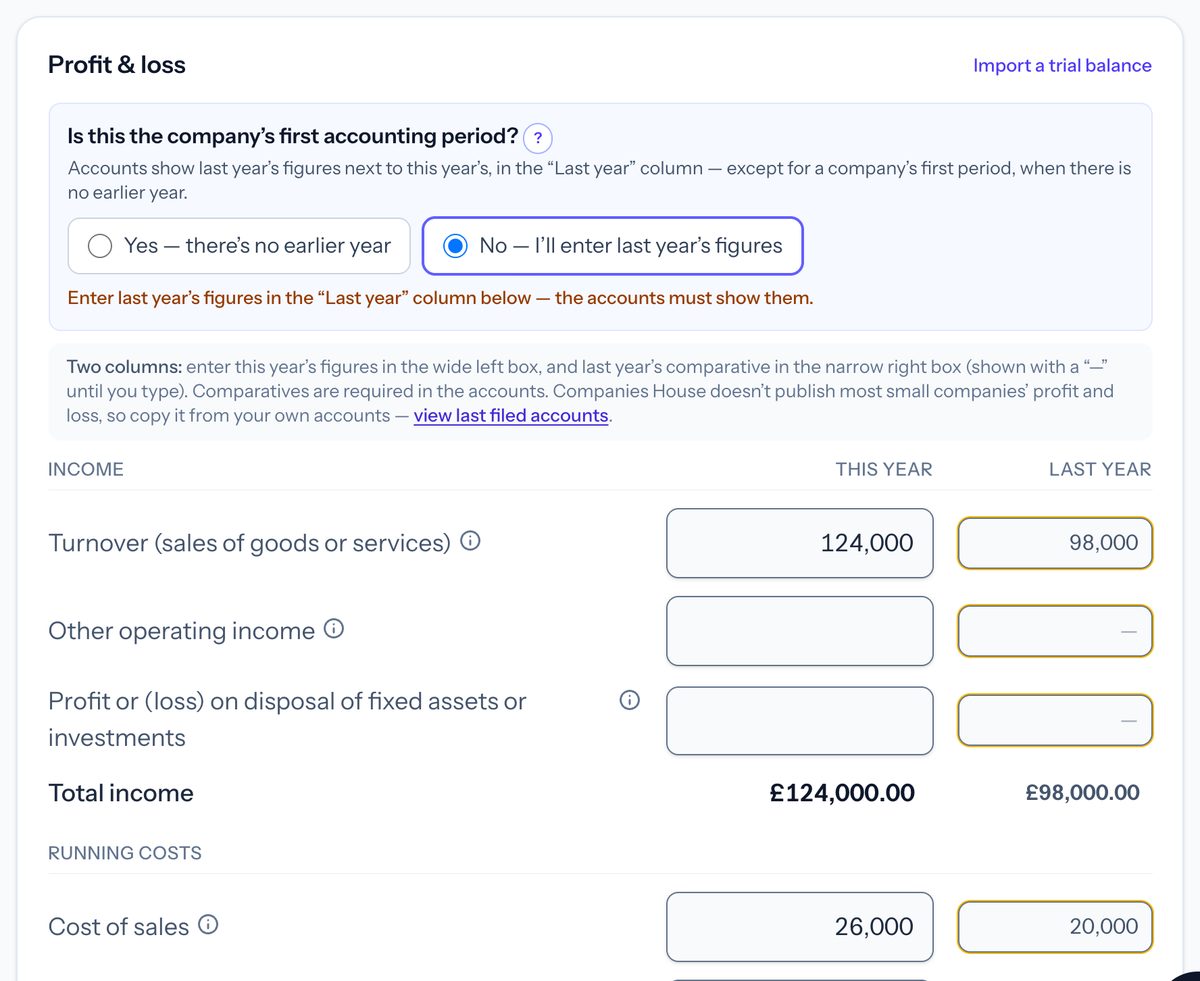 In Taxley: last year's figures go in the narrow right-hand boxes, and totals such as total income are worked out for both years (demo company).
Step 3: Enter last year's balance sheet
In Balance sheet, enter last year's closing figures in the right-hand column, line by line. Enter amounts the company owed as positive numbers under creditors, because Taxley deducts them for you. Brightwater's column holds debtors of £6,000 and cash at bank and in hand of £40,000. It also holds creditors due within one year of £9,600, of which Corporation Tax payable was £7,600. The capital and reserves lines are called-up share capital of £100 and a profit and loss account of £36,300. Net assets and total capital and reserves both come to £36,400.
Step 4: Match this year's retained earnings brought forward
Last year's closing profit and loss account is this year's opening figure, so Retained earnings brought forward is £36,300 for Brightwater. If the two differ by £1 or more, an amber warning names both figures and says "They're normally the same." One click on "Use last year's closing figure" copies last year's figure in. This year's closing figure is then £48,270: £36,300 brought forward, plus profit after tax of £41,970, less dividends paid of £30,000. Retained earnings movement and dividends paid explains that part.
Step 5: Check that last year's balance sheet balances
Under last year's Total capital and reserves, Taxley compares last year's net assets with capital and reserves to the penny. If they differ, an amber message gives the likely cause and, where the fix is clear, a button that applies it. When the column balances, the message disappears. The return can't be filed while the message shows. In Simple mode, the same check appears at the foot of last year's balance sheet.
Where do last year's losses go on the balance sheet?
Last year's accumulated losses go in one box: last year's closing Profit and loss account (retained earnings), typed in its narrow "Last year" box as a negative number, such as −2,100 for a £2,100 deficit. There is no brought-forward box for last year, because last year's accounts show only last year's closing figure. This year's Retained earnings brought forward is that same figure.
Taxley says so under the row: "Last year: enter last year's closing figure (from last year's accounts) in the Last year box. There's no brought-forward box for last year — the accounts only show last year's closing figure. Negative if it's a deficit." While this year's brought-forward box is blank, or differs from last year's closing figure by £1 or more, a "Use last year's closing figure" button copies last year's figure across in one click. Editing last year's box never changes this year's figures.
Other reserves is only for a separate reserve that your accounts show on its own line, such as a capital redemption reserve. Don't use it to make last year's column balance. If last year doesn't balance, one box is wrong, and a deficit typed as a positive number is the most common cause. The next section shows how Taxley finds it.
Tax losses are different, and they never go into retained earnings. A trading loss carried forward is a figure from last year's tax computation, and GOV.UK says the profit or loss for Corporation Tax "is different from the profit or loss shown in your annual accounts" (GOV.UK: Company Tax Returns). Enter it under Losses from earlier periods in Tax adjustments, or Trading losses in Simple mode, never in retained earnings brought forward. Trading losses brought forward: Corporation Tax and CT600 box 285 explains why the two figures usually differ.
Why does Taxley say "Last year's balance sheet doesn't balance"?
Taxley says this because last year's net assets and last year's capital and reserves differ, and a balance sheet must balance before accounts can be filed. The cause is almost always one mistyped or misplaced box. The message gives both totals and the difference, then names the likely cause, and the size of the difference is the best clue.
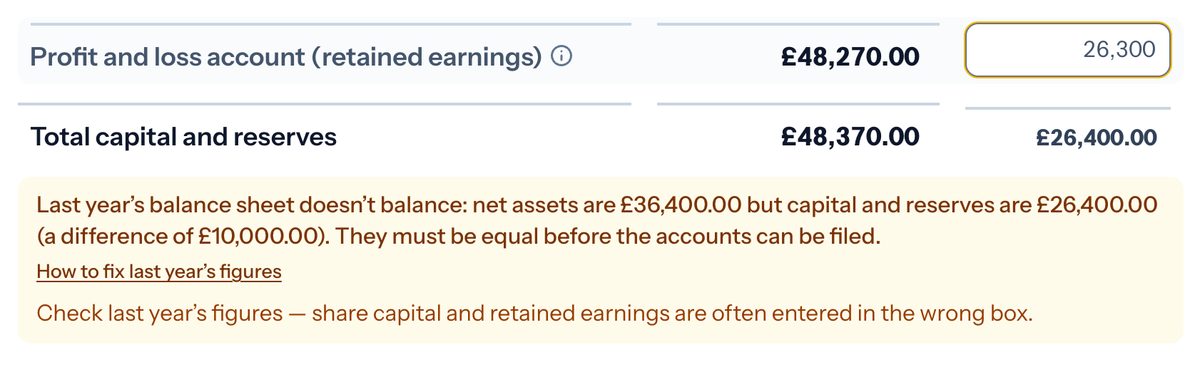 In Taxley: a typo in last year's profit and loss account shows up at once as a £10,000 difference, with a link to this guide (demo company).
In the demo, last year's profit and loss account was typed as 26,300 instead of 36,300. Net assets are £36,400 but capital and reserves are £26,400, a difference of exactly £10,000, and a round difference like that points to one wrong digit. No specific pattern fits, so Taxley shows its general finding: "Check last year's figures — share capital and retained earnings are often entered in the wrong box." If this year's £36,300 brought forward was already saved, the amber warning from Step 4 would also appear, because it no longer matches.
| Last year's line | Correct | As typed |
|---|---|---|
| Debtors | £6,000 | £6,000 |
| Cash at bank and in hand | £40,000 | £40,000 |
| Creditors due within one year | (£9,600) | (£9,600) |
| Net assets | £36,400 | £36,400 |
| Called-up share capital | £100 | £100 |
| Profit and loss account | £36,300 | £26,300 |
| Total capital and reserves | £36,400 | £26,400 |
Taxley never adds a balancing figure. The check stays until the figures agree, and a suggested fix changes your boxes only when you click it. The patterns below come from real returns that were stuck on this message.
A deficit typed as a positive number
Accumulated losses make the profit and loss account negative, and a negative figure is entered with a minus sign. Suppose cash was £900, creditors £2,900 and share capital £100, so the reserve should be −£2,100. If it is typed as 2,100, the difference is exactly twice the reserve. Taxley then says: "Last year's profit and loss account looks like a deficit (net liabilities). A deficit is entered as a negative number, e.g. −2,100." One click on "Change it to −2,100" fixes it.
Share capital typed into the reserves box
Share capital belongs in Called-up share capital, not in the profit and loss account. If there is no share capital and the reserve is a typical share figure (£1, £2, £10, £50, £100 or £1,000), Taxley says, for example: "There is no share capital, and the profit and loss account holds £100, a typical share capital figure." For a dormant company whose only figure is that one, Taxley instead explains that its balance sheet "is usually just its shares" and offers two buttons: "The shares were never paid for" and "The share money is in the bank".
Unpaid share capital left out
A difference of exactly £1 is usually a £1 share that was never paid for. Taxley says: "A £1 difference is usually share capital: check Called-up share capital, and if the share was never paid for, enter £1 as Called-up share capital not paid." Called-up share capital not paid is the first row of Taxley's balance sheet.
Only the retained-earnings box filled
Capital and reserves can't balance on their own, because the assets and debts must be there too. If last year's column holds only capital and reserves, Taxley says there are "no assets or liabilities" and asks you to "Enter last year's assets (for example cash at bank, or share capital not yet paid) and what the company owed, so that net assets come to the same figure."
A missed or mistyped line
If the difference equals one line in last year's signed accounts, that line is probably missing. A round difference, such as the demo's £10,000, usually means one wrong digit. Correct the box that is wrong rather than adjusting reserves to fit. Company balance sheet does not balance? sets out a fuller checking order.
How does Taxley compare last year with the accounts filed at Companies House?
If last year doesn't balance and the company's accounts are on Companies House, Taxley lists each line where the filed balance sheet differs from yours. It may also offer to replace your figures with the filed ones. Nothing changes until you click "Replace last year's figures", and an Undo button puts your own figures back afterwards.
The comparison appears inside the amber message when the page loads. It starts "Your accounts filed at Companies House (balance sheet at …) show different figures:" and lists lines such as "Your accounts filed at Companies House show Cash at bank and in hand £1,200 — you entered £700". Other lines end "you left it blank" or, for a section total, "yours come to …". Each line disappears once your box matches the filed figure.
Below the lines, open "Replace last year's figures with the ones filed at Companies House". A table shows each line that would change, under Line, Yours, After and Why, where Why reads, for example, "From the filed accounts". Every other figure stays as it is. Taxley offers this only when the result balances to the penny, and not once the return is paid for or sent. Choose "Replace last year's figures", or first follow "See these accounts at Companies House".
A green notice then confirms "Last year's figures were replaced with the ones filed at Companies House", with the number of lines changed, "View filed accounts" and Undo. Check each figure against your own accounts. Where the filed accounts show capital and reserves as one total, Taxley works out the profit and loss account from it ("Worked out: capital and reserves less the other lines"), so check that share capital sits in its own box.
Next step: have last year's signed accounts ready, then start your return in Taxley. Taxley prepares and files the CT600 to HMRC, and files your accounts at Companies House too.
Frequently asked questions
Can the "Last year" column be left blank?
Not after the first year. Until it is filled, Taxley shows "Enter last year's profit and loss figures (the comparatives), or answer "Is this the company's first accounting period?" with Yes if there is no earlier year." For a dormant company, Taxley asks only for last year's balance sheet.
What if last year's figures aren't comparable with this year's?
The law lets you adjust last year's amount when it isn't comparable with this year's, but the accounts must then explain the non-comparability and any adjustment in a note (SI 2008/409, Schedule 1, paragraph 7(2)); micro-entities are exempt from that note. Check the guidance carefully if you're unsure whether an adjustment is needed.
Are last year's figures part of the Company Tax Return?
Yes, through the accounts. GOV.UK says statutory accounts go to HMRC as part of the Company Tax Return, and those accounts must show last year's corresponding amounts. So last year's profit, tax charge and balance sheet reach HMRC in the comparative column.
Why doesn't Companies House show last year's profit and loss?
Small companies can choose not to send it. GOV.UK says a small company can choose whether to send its profit and loss account, and a micro-entity can send only its balance sheet. Copy last year's profit and loss from your own signed accounts, or ask your accountant.
Is there a brought-forward box for last year?
No. Last year's accounts show only last year's closing profit and loss account, so type that figure in its "Last year" box, negative for a deficit. This year's retained earnings brought forward should equal it. Don't use Other reserves to make last year balance, and never enter a tax loss on the balance sheet.
What happens if last year's return was filed with Taxley?
If your previous Taxley return covers the period just before this one, Taxley carries its figures into the "Last year" column, and they can't be changed on this page. If it covers an earlier period, Taxley says its figures "aren't used as last year's" and asks you to enter them.
General information, not personalised tax or accounting advice. Rules checked against legislation.gov.uk and GOV.UK on 24 September 2026. Brightwater Design Ltd is a fictional demo company.
People also ask
Keep reading


Ready to file your Company Tax Return?
Confirm support for your accounting period, accounts and any supplementary pages before paying. Taxley support can answer software questions, not provide a tax opinion.
Questions about your period or accounts? Ask about software support